Save Links to LaterMark Using the iOS Share Sheet
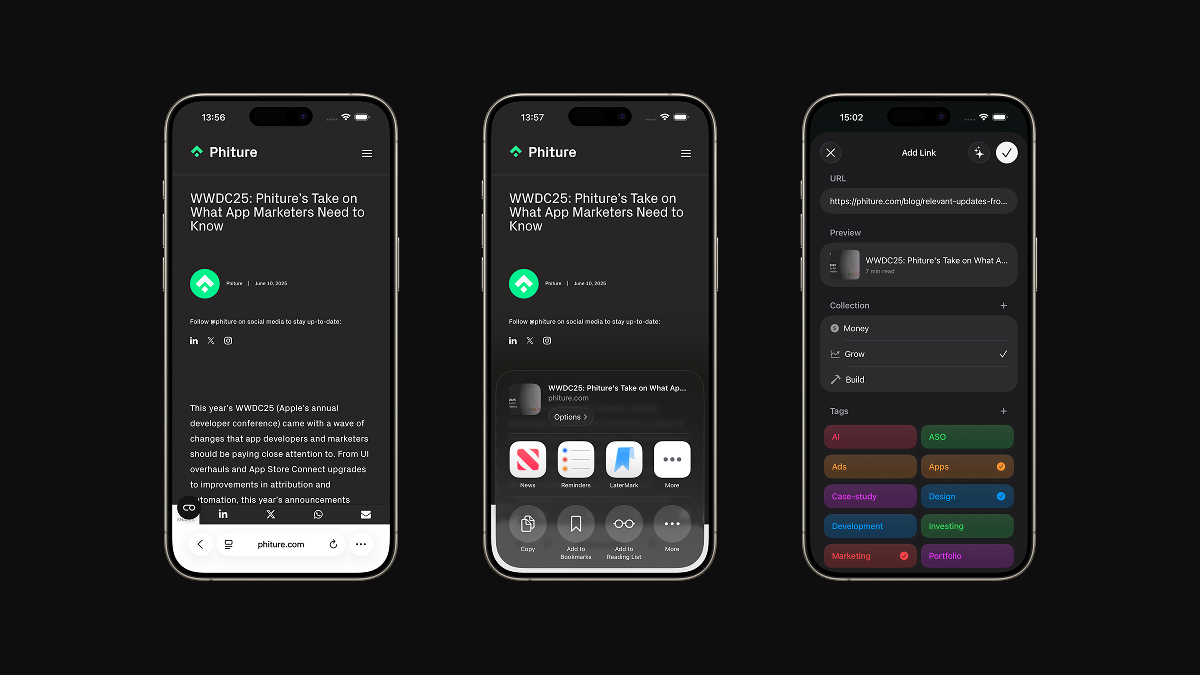
LaterMark integrates with the iOS Share Sheet so you can save links from any app without switching context. It is the fastest way to capture articles, videos, and pages when you are browsing.
How to save a link with the Share Sheet
- Open a webpage in Safari, a link in Messages, or content in any app that supports sharing.
- Tap the Share button (the square with an arrow pointing up).
- Find and tap LaterMark in the row of app icons.
- Confirm the save or add tags and notes if you want.
The link is now saved in LaterMark and ready to read later.
How to make LaterMark visible in the Share Sheet
If you do not see LaterMark in the Share Sheet, you may need to enable it manually.
- Tap the Share button on any webpage or link.
- Scroll to the end of the app icons row in the Share Sheet.
- Tap “More” or “Edit Actions…” (the button with three dots).
- Find LaterMark in the list of apps.
- Toggle it on or tap the green plus icon to add it.
- Drag LaterMark to reorder it higher in the list for easier access (optional).
- Tap “Done” to save your changes.
LaterMark will now appear in the Share Sheet whenever you share a URL.
If LaterMark does not appear in the Share Sheet
Here are some common fixes if you do not see LaterMark as an option:
- Open LaterMark at least once after installing it. iOS registers share extensions only after the first launch.
- Make sure you are sharing a URL. LaterMark only appears when the shared content includes a web link (not photos, files, or text without a URL).
- Check iOS version. Share extensions work best on iOS 15 or later. If you are on an older version, consider updating.
- Scroll all the way to the end of the app row in the Share Sheet. New apps sometimes appear at the far right.
- Restart your device. iOS occasionally needs a restart to recognize new share extensions.
- Reinstall the app if the issue persists. Delete LaterMark, restart your device, then reinstall from the App Store.
Pro tip
Once you have enabled LaterMark in the Share Sheet, drag it closer to the front of the app row so you can find it faster every time you save a link.